Chrome extension for developers & QA

Record a click-through. Replay it. Export a test.

Open any page, press record, and click through your flow. StepRecorder captures every step as an editable, numbered list — replays it to verify (waiting for elements, checking your assertions) — and exports a clean Playwright or Cypress test, plus a numbered screenshot strip. One click. No terminal, no codegen CLI, no setup.

Add to Chrome — Free See pricing Free is unlimited · Pro is a one-time license
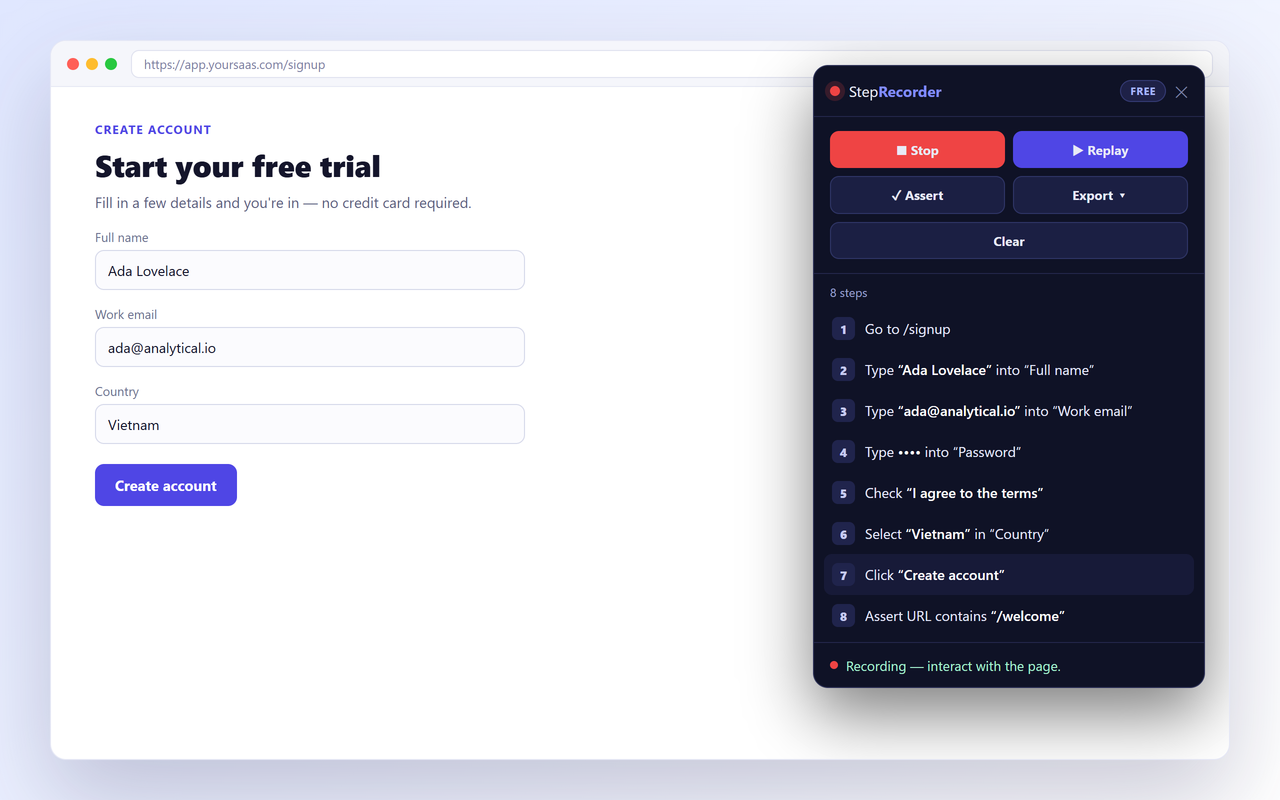
StepRecorder sidebar showing a numbered step list recorded from a form, with record/replay/assert/export controls

From a click-through to a real test — without writing code

StepRecorder records what you do, lets you verify it, and hands you idiomatic test code.

Records the real flow

Clicks, typing, selects, checkboxes and radios, Enter-to-submit, navigations — even elements inside web-component shadow DOM. One click, no DevTools.

Replay to verify

Re-runs your steps on the page, waiting for elements to appear so it doesn't flake, and reports what passed. See it work before you export.

Assertions built in

Click any element to assert it's visible, has the right text, or that the URL is correct. Your export becomes a real test — not a click log.

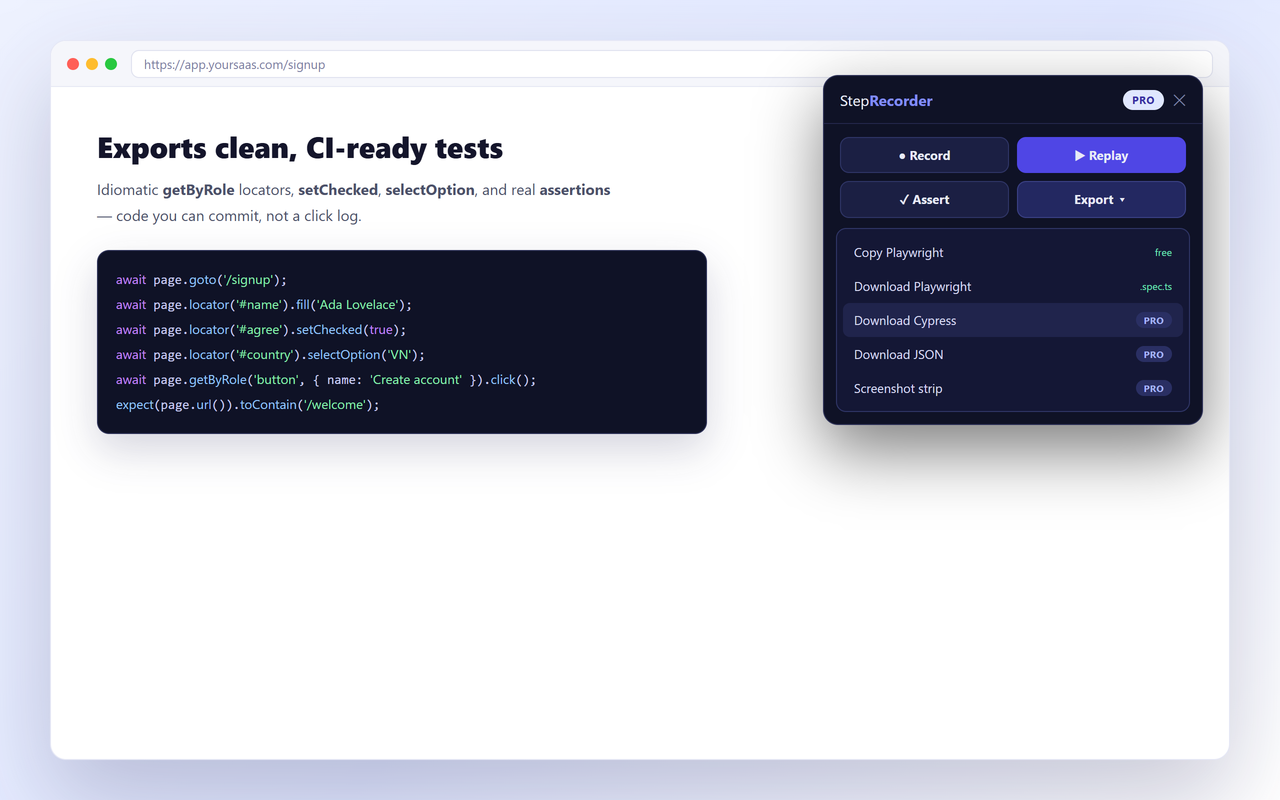
Playwright & Cypress export

Idiomatic getByRole locators, setChecked, and expect assertions that run in CI without cleanup. Cypress + JSON are Pro.

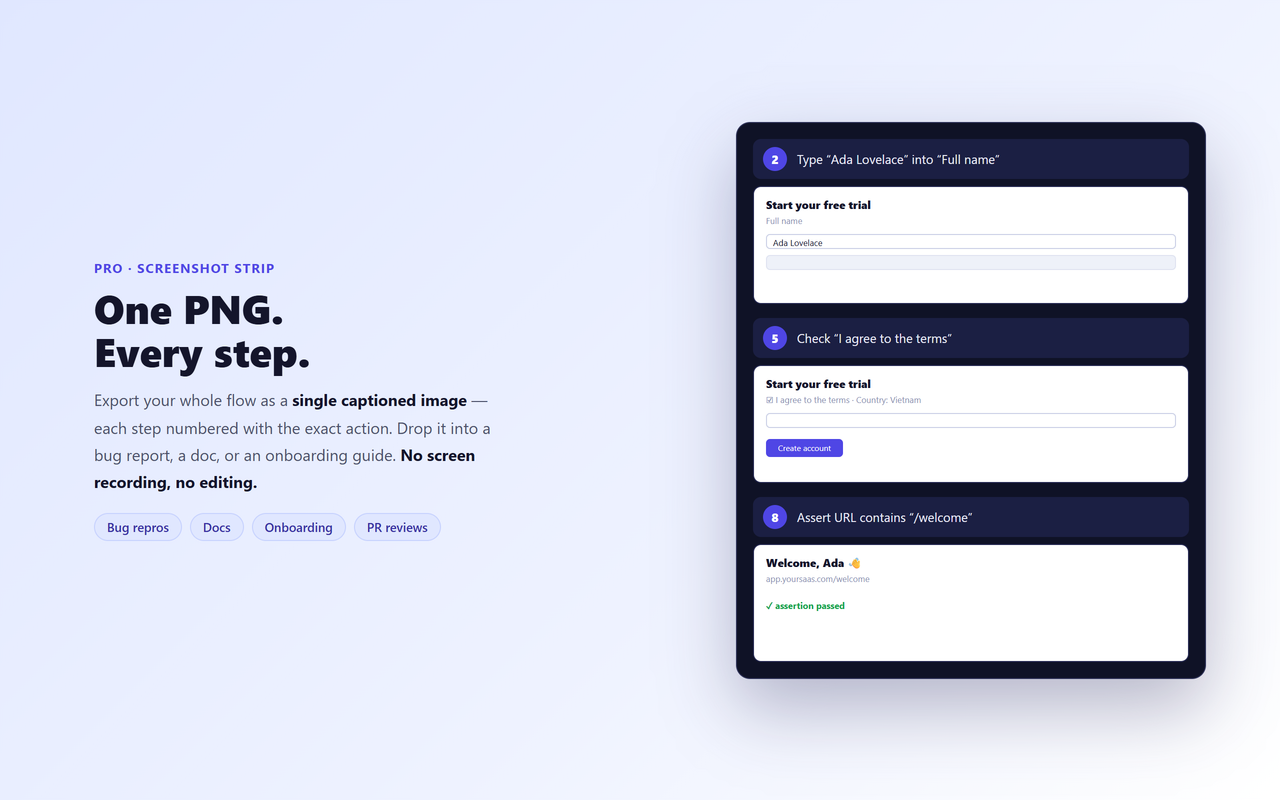
Numbered screenshot strip

One PNG documenting every step with its action — perfect for bug reports, docs, and onboarding. Replaces a separate screen-record tool. (Pro)

🔒

Privacy-first

Passwords, card/CVV, and tokens in URLs are masked automatically. Recordings stay on your device — nothing is uploaded.

See the assertions — and the one-click export

Replay verifies each step; then a single menu hands you a real Playwright or Cypress test.

StepRecorder replay panel showing a passed element-visibility assertion and an export menu with Playwright and Cypress options

Three steps

1

Open & record

Load the page, click the icon, press ● Record.

2

Click through

Do your flow. Add ✓ assertions on anything that matters.

3

Replay & export

Replay to verify, then export a Playwright/Cypress test or a screenshot strip.

A test — and a screenshot report — from one recording

The numbered screenshot strip turns a scan into a shareable, client-ready deliverable.

StepRecorder numbered screenshot strip: one PNG with a captioned screenshot per recorded step of a login flow test

Simple pricing

One-time license, no subscription.

Free
$0
  • Unlimited steps per recording
  • Editable numbered step list
  • In-tool assertions
  • Single-page replay
  • Playwright export (copy + download)
Add to Chrome
Best value
Pro
$49 one-time
  • Everything in Free
  • Cypress & JSON export
  • Numbered screenshot strip (PNG)
  • Seamless cross-page replay
  • Lifetime updates · 3 devices
Get Pro

$49 once · no subscription · secure Paddle checkout

Not sure yet? Start free — unlimited steps, no time limit. Upgrade only when you need Cypress export or the screenshot strip, and even that's covered below.

🛡️ 30-day money-back guarantee — no questions asked. If Pro isn't right for you, email connect@vietcodex.dev with your Paddle receipt within 30 days and we'll refund every cent — no reason needed, no upsell call, a real human replies. Refund policy →

Team or agency? Talk to us about volume licenses.

Built to be trusted

An honest, privacy-first tool from an independent developer — every claim here is verifiable.

Made by an indie dev

Built and maintained by Vietcodex, a solo developer shipping privacy-first browser extensions — TailGrab, ScriptDrag and AnswerGap. No VC, no ads, no telemetry.

🔑

Minimal permissions

Requests only activeTab, scripting and storage. Broad page access is optional — asked only if you turn on cross-page replay, and you can decline. Check it yourself on the store listing.

🔒

Your recordings stay local

Nothing about the pages you record ever leaves your browser. The only network call is a periodic license check for Pro — no analytics SDK, no remote code.

🔁

Actively maintained

Kept working against Chrome and Firefox browser updates. Pro includes lifetime updates. Last updated July 2026.

💳

Secure one-time payment

Checkout is handled by Paddle, our Merchant of Record — your card details never touch our servers and sales tax/VAT is handled for you. $49 once, no subscription.

🛡️

30-day money-back

Not right for you? Email connect@vietcodex.dev within 30 days — no questions, no reason needed. Refund policy →

Add StepRecorder to your browser

Free to start — install, open a page, and press Record.

Add to Chrome — Free

Live on Chrome & Firefox — Edge is on the way.

Already using StepRecorder? Be one of the first to rate it on the store — it helps other developers find it, and we read every review.

Frequently asked questions

Is StepRecorder free?

Yes. The Free tier is unlimited — unlimited steps, an editable numbered step list, in-tool assertions, single-page replay and Playwright export — with no login. Pro ($49 one-time) adds Cypress & JSON export, the numbered screenshot strip, seamless cross-page replay, lifetime updates and 3 devices.

Do I need an account or login?

No. StepRecorder is a browser extension with no sign-up. Your recordings stay on your device.

Does my data leave my machine?

No. Recordings stay local and are never uploaded. Passwords, card/CVV fields, and tokens in URLs are masked automatically before a step is stored or exported. The only network request StepRecorder makes is a periodic license check for Pro — nothing about the pages you record is ever sent.

How is it different from Playwright codegen?

Codegen gives you a raw click log to clean up by hand. StepRecorder gives an editable, numbered step list with built-in assertions and replay-to-verify, then exports the same idiomatic getByRole() Playwright code — plus Cypress export and a numbered screenshot strip.

How is it different from Selenium IDE or Katalon Recorder?

Those export verbose, XPath-heavy scripts. StepRecorder is shadow-DOM and role-aware, replays while waiting for elements so tests don't flake, and outputs modern Playwright or Cypress with real assertions.

Which browsers does it support?

StepRecorder is live now on the Chrome Web Store and Firefox Add-ons. Edge support is coming soon — see the install section above for live store links.

Can it export Cypress, or only Playwright?

Playwright export is free. Cypress and JSON export are part of Pro.

Does it handle multi-page flows?

Single-page replay is free. Seamless cross-page replay, which follows navigations across pages, is a Pro feature.

Can I move my Pro license to a new device?

Yes. Your Pro license activates on up to 3 devices. To move it to a new machine, email connect@vietcodex.dev with your Paddle receipt and we'll free up a seat.
More developer tools from Vietcodex

Privacy-first browser extensions, each a one-time license.

New exporters and frameworks

Get told when we add a test framework, a new export format, or a fix that changes what your recordings produce.

About one email a month. No spam, no sharing — unsubscribe any time by replying. See our privacy policy.