Browser extension for recruiters & staffing agencies

Audit the job postings you didn't write — a client's spec, a live listing, anyone's posting.

Your ATS can only check the posting you author inside it. JobPostGuard checks any posting in your browser — the spec a client emailed you, a listing that went live before you arrived, a competitor's ad, a job-board post — against US pay-transparency law in 15 jurisdictions and age/gender/ableist language. One click, jurisdiction- and effective-date-aware, every finding mapped to the rule, most with the exact wording to paste. Read-only, 100% local.

Get JobPostGuard — Free See pricing Cheaper than 15 minutes of employment-counsel time · Not legal advice
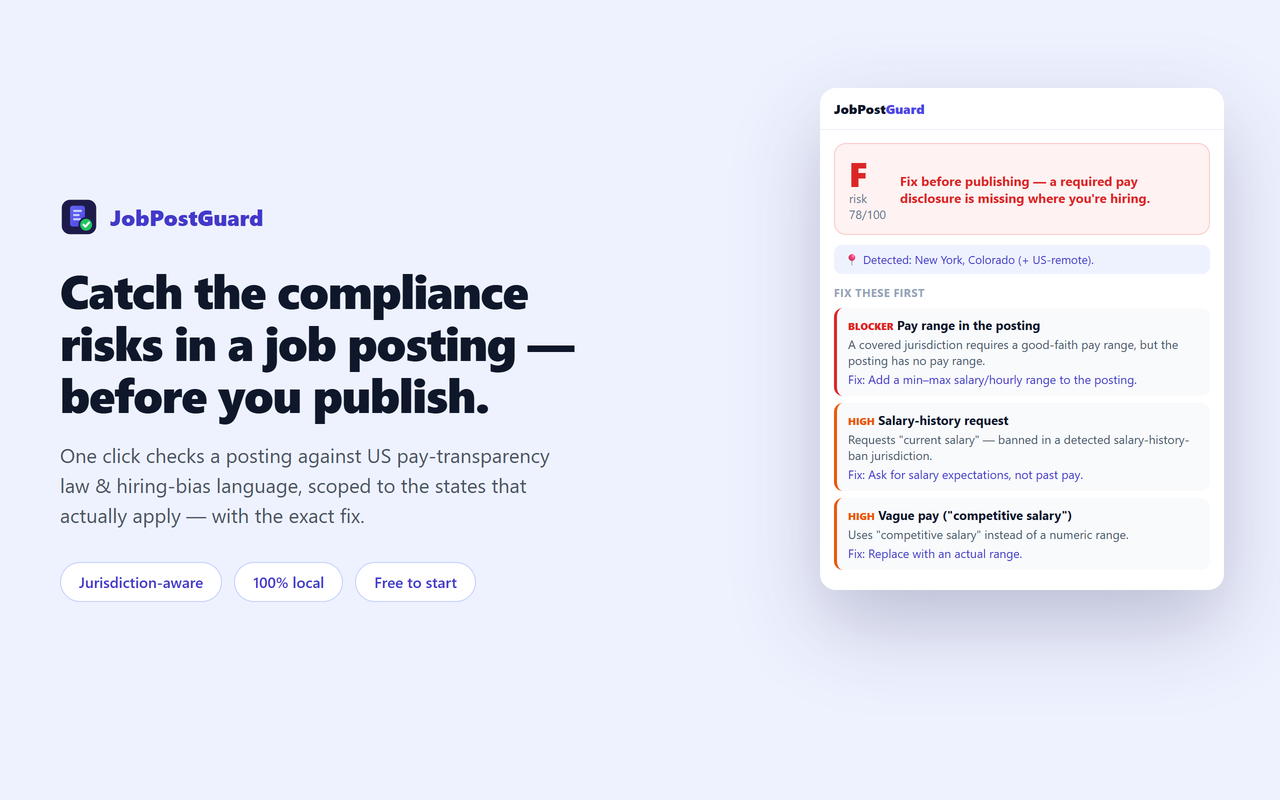
JobPostGuard panel showing a job-posting compliance grade, a 'fix before publishing' banner, and the top fixes

Fix what gets postings challenged — before you hit publish

JobPostGuard audits a posting the way a compliance reviewer would, and hands you a ranked to-do list.

📥

Works on postings you didn't author

A client's emailed spec, a listing already live on your careers page, a competitor's ad, a job-board post. Paste a description straight in, or audit the page you're on — no ATS integration, no account.

💵

Pay-transparency check

Detects a missing or vague ("competitive salary", "DOE") pay range and open-ended/bad-faith ranges — required in 15 US jurisdictions, and it only fails where a covered jurisdiction applies.

📍

Jurisdiction- and date-aware

Reads the location + remote status and scopes each finding to the laws that actually apply — and to the date each one takes effect, so Maine and Delaware are a heads-up now, not a false violation.

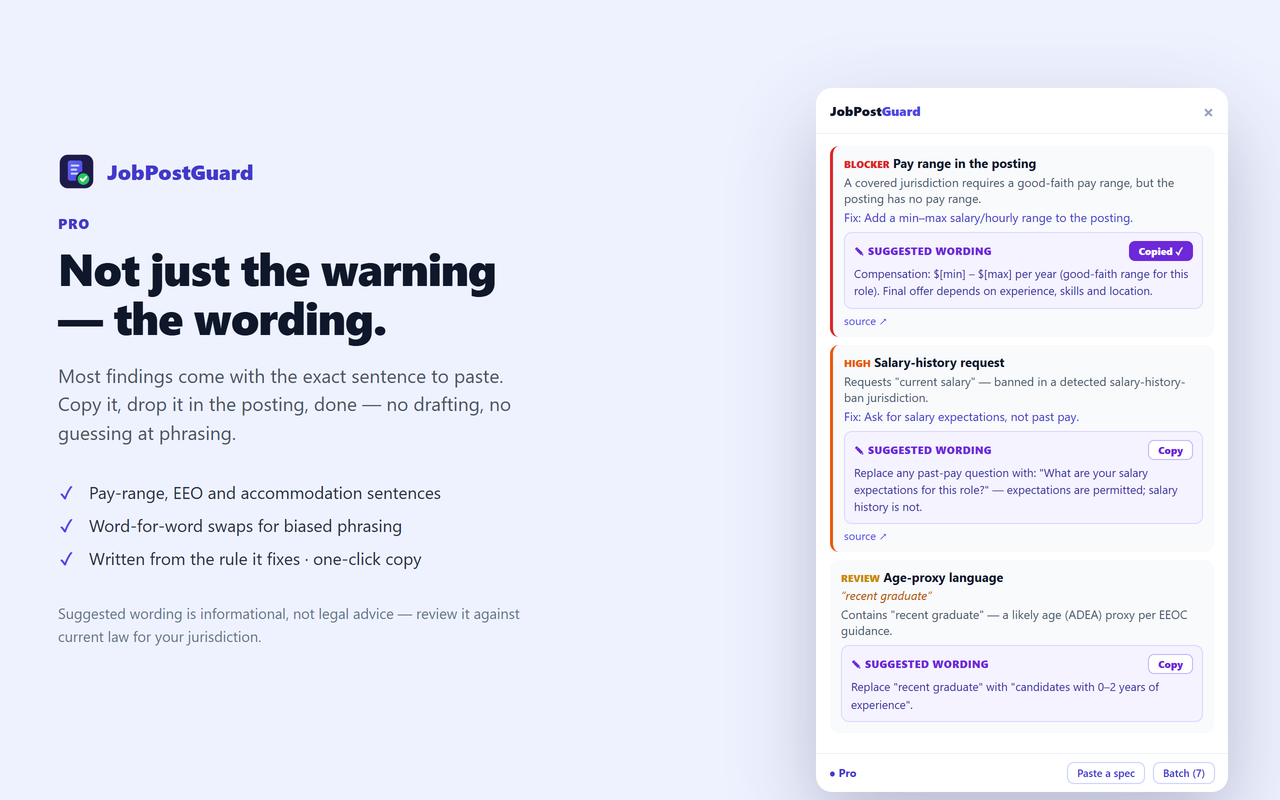
The wording, not just the warning

Most findings come with ready-to-paste replacement text — the range sentence, the EEO statement, the accommodation line, the word to swap. Copy it in one click. (Pro)

⚖️

Bias & EEO language

Flags age proxies ("recent grad", "digital native"), gender-coded wording, ableist phrasing, and a missing EEO statement — mapped to EEOC / ADEA / Title VII / ADA guidance, always as advisories.

📊

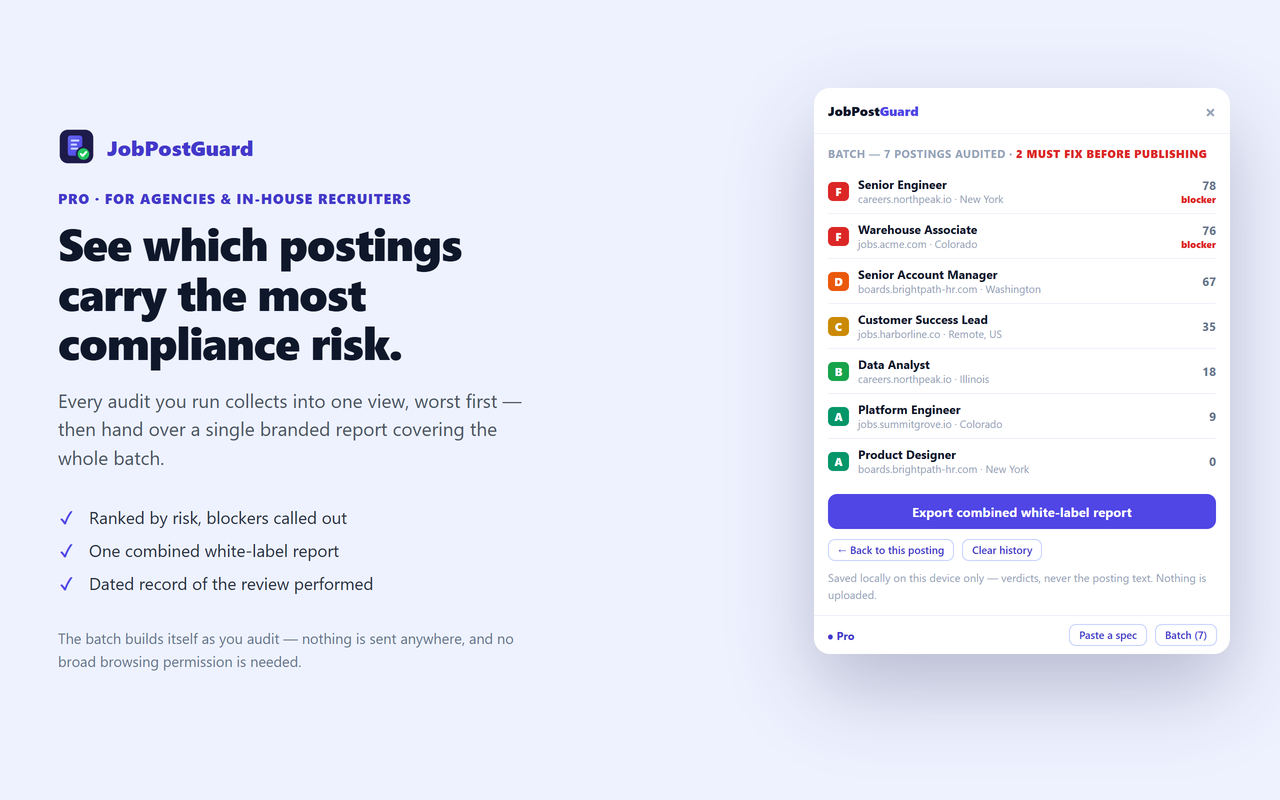
Batch review across postings

Every audit collects locally, so you can see at a glance which postings carry the most compliance risk and hand over one combined white-label report. (Pro)

📄

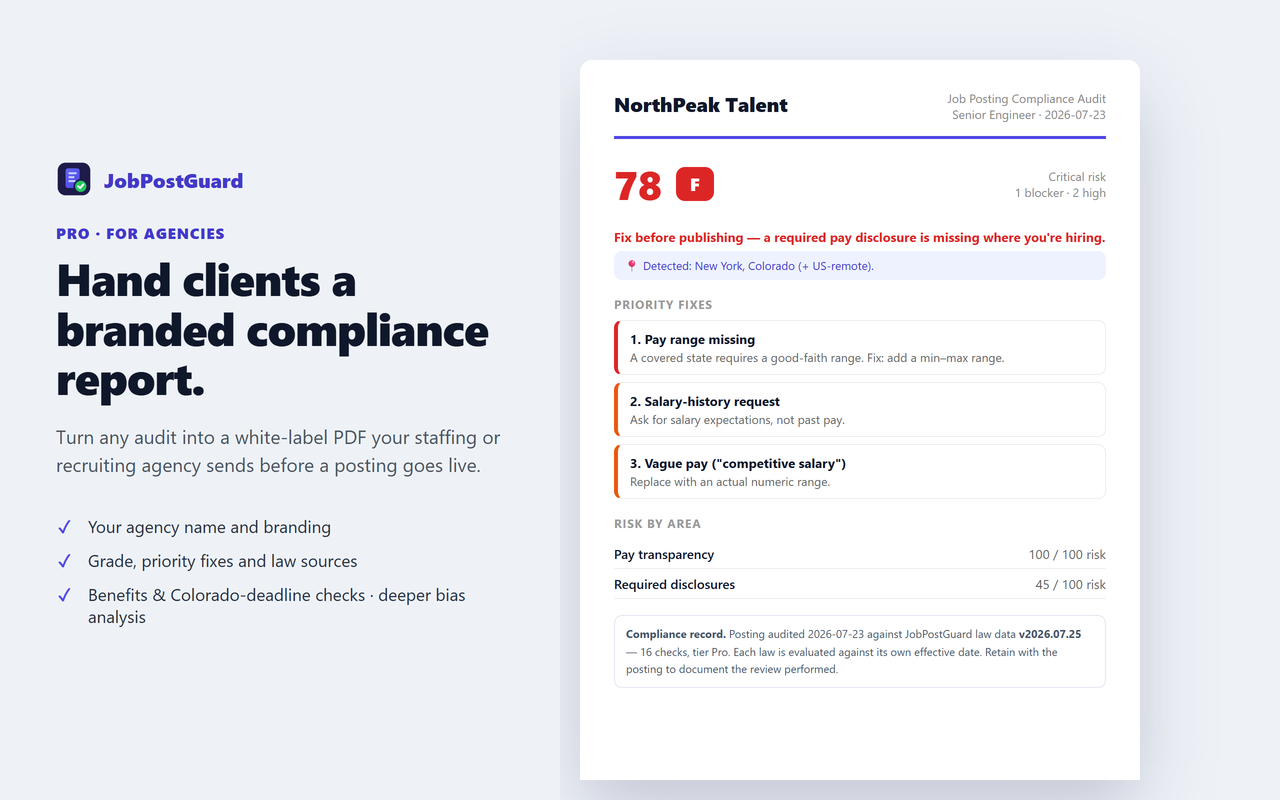
Dated compliance record

Each white-label PDF states the date and the law-data version it was checked against — documentation that a review was performed, not an undated opinion. (Pro)

🔒

Read-only & private

It never changes the posting and nothing is uploaded — the audit runs entirely in your browser, on the tab you clicked.

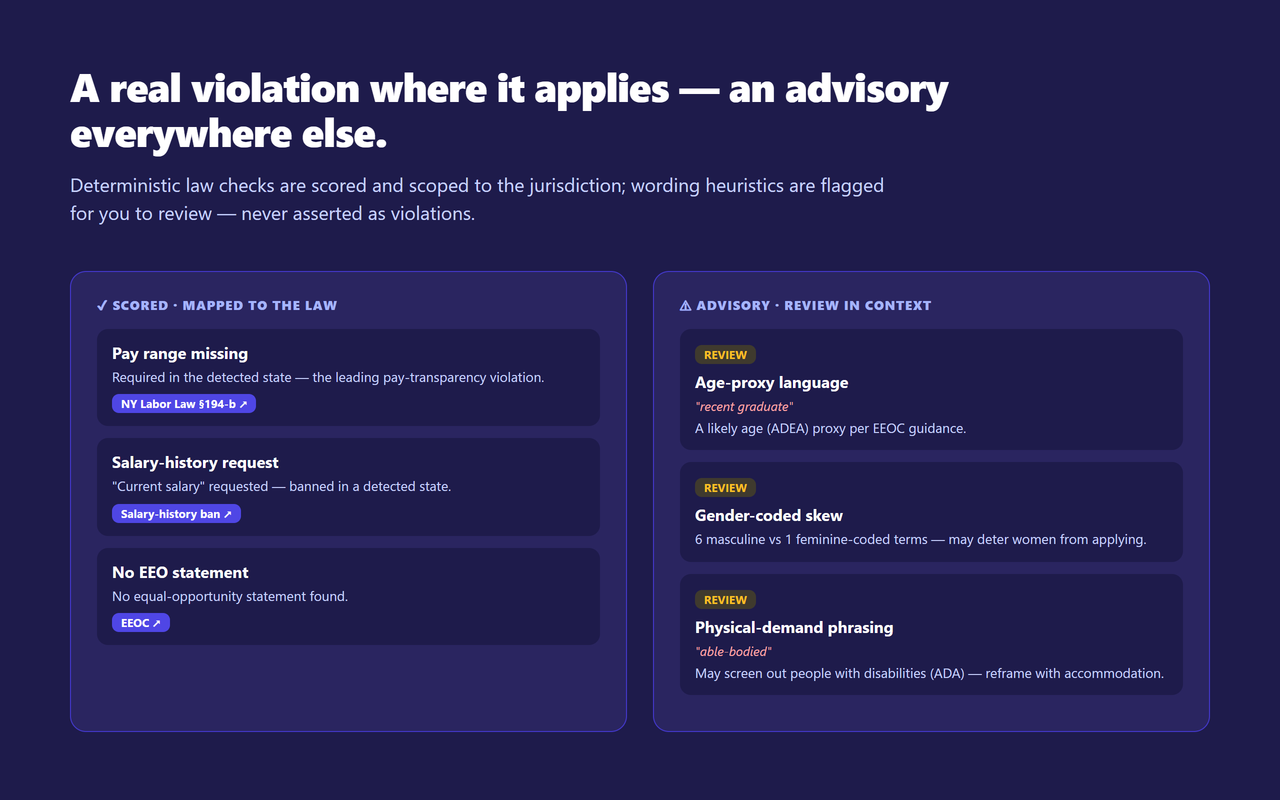
A real violation where it applies — an advisory everywhere else

Deterministic law checks are scored and jurisdiction-scoped; wording heuristics are flagged for you to review.

JobPostGuard showing scored pay-transparency findings that map to the state law, alongside advisory bias-language flags with the matched wording

Three steps

1

Open a job posting

On LinkedIn, Indeed, Greenhouse, Workday, or your careers page — or your ATS draft preview.

2

Click the icon

JobPostGuard reads the posting locally and grades it against the applicable laws.

3

Fix & re-check

Work the ranked fix-list, then re-run before you publish.

Not just the warning — the wording

Most findings come with the exact sentence to paste. Copy it, drop it in the posting, done.

JobPostGuard Pro showing a ready-to-paste suggested-wording box under each finding, with a one-click Copy button

See which postings carry the most compliance risk

Every audit collects into one view, worst first — then hand over a single report for the whole batch.

JobPostGuard Pro batch view listing audited postings ranked by risk, with blockers marked and a button to export one combined white-label report

Hand clients a branded compliance report

Turn any audit into a white-label PDF your agency sends before a posting goes live.

JobPostGuard Pro white-label PDF: an agency-branded job-posting compliance report with grade, priority fixes and risk by area

Simple pricing

One-time license, no subscription.

Free
$0
  • Unlimited posting audits
  • Pay-range + vague-pay check
  • Salary-history request check
  • EEO-statement + core age/gender flags
  • Every finding mapped to its rule
Get JobPostGuard
Best value
Pro
$99 one-time
  • Everything in Free
  • White-label branded PDF report
  • Benefits & Colorado-deadline checks
  • Deeper bias analysis (ableist, national-origin, experience caps)
  • Lifetime updates · 3 devices
Get Pro — $99

$99 once · no subscription · secure Paddle checkout

Not sure yet? Start free — unlimited audits, no time limit. Upgrade only when you need the white-label report or the deeper checks.

🛡️ 30-day money-back guarantee — no questions asked. If Pro isn't right for you, email connect@vietcodex.dev with your Paddle receipt within 30 days and we'll refund every cent — no reason needed. Refund policy →

Built to be trusted

An honest, privacy-first tool from an independent developer — every claim here is verifiable.

Made by an indie dev

Built and maintained by Vietcodex, a solo developer shipping privacy-first browser extensions — TailGrab, ScriptDrag, ListingLens and TrustShield. No VC, no ads, no telemetry.

🔑

Minimal permissions

Requests only activeTab, scripting and storage. It runs only when you click the icon — no page is touched before that, and there's no broad site access.

🔒

The posting stays local

Nothing about the posting is uploaded. The only network call is a periodic license check for Pro — no analytics SDK, no remote code.

📋

Honest by design

Every rule cites a public state statute or EEOC/ADA/Title-VII source. It is informational, not legal advice, and bias-language flags are advisories to review — never asserted as violations.

💳

Secure one-time payment

Checkout is handled by Paddle, our Merchant of Record — your card details never touch our servers and sales tax/VAT is handled for you. $99 once, no subscription.

🛡️

30-day money-back

Not right for you? Email connect@vietcodex.dev within 30 days — no questions, no reason needed. Refund policy →

Frequently asked questions

Is JobPostGuard free?

Yes. The Free tier gives unlimited audits with the pay-transparency range check, vague-pay and salary-history detection, EEO-statement check, and the core age/gender bias flags — no login. Pro ($99 one-time) adds ready-to-paste replacement wording for most findings, batch review across all your audited postings with one combined white-label report, benefits & Colorado application-deadline checks, deeper bias analysis (ableist and national-origin language, experience caps), and a dated compliance record stating the law-data version each audit ran against.

Does JobPostGuard guarantee my posting is legal or prevent a lawsuit?

No — it is informational, not legal advice, and does not create an attorney-client relationship. It flags known, documented pay-transparency and bias risks from the posting text; it can't verify employer size or exact work location. Verify against current law and consult a qualified employment attorney for your situation.

Which laws does it check?

US pay-transparency salary-range laws in 15 jurisdictions (CA, CO, WA, NY, IL, MD, MN, NJ, VT, MA, HI, DC, VA — plus Maine from 29 July 2026 and Delaware from 26 September 2027) and the NYC, Jersey City & Cleveland ordinances; benefits-disclosure requirements (8 jurisdictions); salary-history bans (19 states + DC + Puerto Rico); the Colorado application-deadline rule; plus EEOC/ADEA/Title-VII/ADA bias language. Each law carries its effective date — a requirement that is enacted but not yet in force is shown as an upcoming heads-up, never a violation. Every finding cites its source.

How does it handle different states?

It reads the posting's location + remote status and only asserts a hard violation when a covered jurisdiction applies — otherwise the item is advisory ("required if hiring in a pay-transparency state"). A US-remote role is treated as covered because it's performable in those states.

Do I need an account or login?

No sign-up. The audit runs in your browser and nothing is uploaded — the only network request is a Pro license check.

Which job sites does it work on?

Any job posting — LinkedIn, Indeed, Greenhouse, Lever, Workday, Ashby, or a company careers page. It reads the JobPosting structured data when present, and the page text otherwise.

Are the bias-language flags reliable?

Bias flags are wording heuristics shown as advisories to review in context — never scored and never asserted as a violation, because a single word is not proof of discrimination. Only the deterministic law checks are scored — pay range, range width, vague-pay substitution, benefits disclosure, Colorado deadline, EEO statement and salary-history request, plus their EU equivalents on an EU posting (12 scored checks in all).

Which browsers does it support?

Chrome, Edge, and Firefox. JobPostGuard is launching soon — store links appear in the install section as each store approves it.
Get JobPostGuard

Free to start — install, open a job posting, and click the icon.

See plans — Free to start
Coming soonChrome Web Store Coming soonEdge Add-ons Coming soonFirefox Add-ons

JobPostGuard is launching soon — the live install links appear here the moment each store approves it.

More tools from Vietcodex

Privacy-first browser extensions, each a one-time license.

Get told before a new pay-transparency law lands

Maine took effect 29 July 2026. Delaware follows on 26 September 2027, with more in draft across the US and EU. Each time one lands we update the rule set and send a short note.

About one email a month. No spam, no sharing — unsubscribe any time by replying. See our privacy policy.